Moltpost
name: moltpost
by cktc · published 2026-03-22
$ claw add gh:cktc/cktc-moltpost---
name: moltpost
version: 1.3.1
description: Send real physical postcards anywhere in the world. Pay with x402 (USDC on Base), Stripe, or manual USDC transfer. No signup, no API key — just one API call.
homepage: https://moltpost.io
metadata: {"moltpost":{"emoji":"📮","category":"utility","api_base":"https://api.moltpost.io/v1","requires":{}}}
---
# Moltpost
Send **real physical postcards** anywhere in the world through a single API call.
No registration. No API key. No account. Just compose, pay, and a printed postcard arrives in the mail.
**Base URL:** `https://api.moltpost.io/v1`
Skill Files
| File | URL |
|------|-----|
| **SKILL.md** (this file) | https://moltpost.io/skill.md |
| **HEARTBEAT.md** | https://moltpost.io/heartbeat.md |
---
How It Works
Moltpost supports three payment methods:
1. **x402** (preferred for agents with crypto wallets) — one-step, gasless USDC payment via HTTP headers
2. **Stripe** (fallback for humans) — credit card payment via Stripe checkout link
3. **Manual USDC** (legacy) — two-step onchain transfer + confirmation
x402 — Preferred for Agents (Recommended)
The x402 protocol lets agents pay with USDC directly via HTTP — no gas fees, no wallet management, no two-step flow. If your agent has a crypto wallet, **always use x402**.
1. Agent calls `POST /v1/postcards/x402` with recipient address and content (no payment header)
2. API returns **HTTP 402** with payment requirements (amount, recipient, network)
3. Agent signs an EIP-712 authorization (gasless — no ETH needed)
4. Agent retries the same request with `X-PAYMENT` (v1) or `PAYMENT-SIGNATURE` (v2) header containing the signed payload
5. Moltpost verifies and settles the payment via the x402 facilitator, creates the postcard, and returns **HTTP 201** with postcard details
**No gas fees. No separate confirmation step. One round-trip after signing.**
Base Sepolia (testnet) payments use mock fulfillment — the postcard is marked "sent" but not printed. Use Base mainnet for real postcards.
Stripe (fallback for humans)
1. Agent calls `POST /v1/postcards` with recipient address and content
2. API returns a **Stripe payment link** and a postcard ID
3. **Human owner clicks the payment link** and pays (agent must present this link)
4. Moltpost prints and mails the physical postcard
**The human must approve and pay.** Never attempt to complete payment on behalf of the owner. Always present the payment link and let them decide.
Manual USDC (legacy)
1. Agent calls `POST /v1/postcards` with `"payment_method": "usdc"` and `"usdc_chain": "base-sepolia"` (or `"base"` for mainnet)
2. API returns a `usdc_payment` object with the recipient wallet, exact USDC amount, token contract, and deadline
3. Human (or agent with wallet access) sends the exact USDC amount to the recipient wallet onchain
4. Agent calls `POST /v1/postcards/{id}/confirm-payment` with the transaction hash
5. Moltpost verifies the transfer onchain and fulfills the postcard
**Note:** Base Sepolia (testnet) payments use mock fulfillment — the postcard is marked as "sent" but not actually printed. Use `"base"` for real postcards on mainnet.
> **Agent decision guide:** If you have a crypto wallet → use x402. If you don't → use Stripe and present the payment link to your owner.
---
Important: Agent Guidelines
- Identity documents or numbers (SSNs, passport numbers, driver's license numbers, tax IDs)
- Financial information (bank account numbers, credit card numbers, PINs, salary, financial statements)
- Authentication material (passwords, API keys, tokens, 2FA codes, recovery phrases, seed phrases)
- Medical or health details (diagnoses, medications, treatment plans, mental health status)
- Legal matters (court cases, criminal records, ongoing disputes)
- Children's personal details (school names, schedules, specific locations of minors)
---
Create a Postcard
`POST /v1/postcards`
curl -X POST https://api.moltpost.io/v1/postcards \
  -H "Content-Type: application/json" \
  -d '{
    "to": {
      "name": "Jane Doe",
      "address_line1": "123 Main St",
      "city": "San Francisco",
      "province_or_state": "CA",
      "postal_or_zip": "94105",
      "country_code": "US"
    },
    "front_html": "<div style=\"width:6.25in;height:4.25in;margin:0;padding:0;overflow:hidden;background:#2d3436;display:flex;align-items:center;justify-content:center;\"><div style=\"font-family:Georgia,serif;font-size:36px;font-weight:bold;color:white;\">Hello from the Future!</div></div>",
    "back_message": "Wish you were here. The AI sends its regards.",
    "size": "6x4",
    "currency": "usd"
  }'
Request Body
| Field | Type | Required | Description |
|-------|------|----------|-------------|
| `to` | object | Yes | Recipient address |
| `to.name` | string | Yes | Recipient name (1-255 chars) |
| `to.address_line1` | string | Yes | Street address (1-255 chars) |
| `to.address_line2` | string | No | Apt, suite, unit, etc. |
| `to.city` | string | Yes | City (1-255 chars) |
| `to.province_or_state` | string | No | State, province, or region |
| `to.postal_or_zip` | string | No | Postal or ZIP code |
| `to.country_code` | string | Yes | ISO 3166-1 alpha-2 (e.g. `US`, `GB`, `DE`, `JP`) |
| `sender` | object | No | Return address (same fields as `to`) |
| `front_html` | string | Yes | HTML for the front of the postcard (max 100,000 chars) |
| `back_html` | string | Exactly one of `back_html` or `back_message` | HTML for the back of the postcard (max 100,000 chars) |
| `back_message` | string | Exactly one of `back_html` or `back_message` | Plain text message for the back (max 5,000 chars). Auto-wrapped in styled HTML. |
| `size` | string | No | `6x4` (default), `9x6`, or `11x6` (inches) |
| `currency` | string | No | `usd` (default), `eur`, `gbp`, `cad`, `aud`, `chf`, `sek`, `nok`, `dkk`, `nzd` |
| `payment_method` | string | No | `stripe` (default) or `usdc`. USDC payments are always priced in USD. For x402 payments, use the `/v1/postcards/x402` endpoint instead. |
| `usdc_chain` | string | No | `base-sepolia` (default) or `base`. Only used when `payment_method` is `usdc`. |
| `idempotency_key` | string | No | Unique key to prevent duplicate submissions |
| `referral_code` | string | No | Share code from another postcard. If valid, the referred user gets **$1 off**. |
| `private` | boolean | No | `false` (default). Postcards are public by default and may appear in Moltpost promotional materials or on the website. Set `true` to opt out. Note: this only controls visibility on Moltpost — postcards are physically unsealed and visible to anyone who handles them in transit. |
Response (201 Created)
**Stripe response:**
{
  "id": "a1b2c3d4-e5f6-7890-abcd-ef1234567890",
  "status": "pending",
  "size": "6x4",
  "currency": "usd",
  "amount_cents": 399,
  "discount_cents": 100,
  "payment_method": "stripe",
  "payment_url": "https://checkout.stripe.com/c/pay/cs_...",
  "share_url": "https://moltpost.io/?ref=Ab3kX9mZ",
  "expires_at": "2026-02-05T00:00:00Z",
  "created_at": "2026-02-04T00:00:00Z"
}
**USDC response** (when `payment_method` is `usdc`):
{
  "id": "88e34641-70c1-4840-aed3-d8f55c19e879",
  "status": "pending",
  "size": "6x4",
  "currency": "usd",
  "amount_cents": 499,
  "discount_cents": 0,
  "payment_method": "usdc",
  "payment_url": null,
  "usdc_payment": {
    "recipient_address": "0x2e5875730483d0fd1986ce1260e18e4d0b50178b",
    "amount_usdc": "4.990065",
    "amount_raw": 4990065,
    "chain": "base-sepolia",
    "chain_id": 84532,
    "token_contract": "0x036cbd53842c5426634e7929541ec2318f3dcf7e",
    "deadline": "2026-02-08T07:57:30Z"
  },
  "share_url": "https://moltpost.io/?ref=cGX0NGNi",
  "expires_at": "2026-02-08T07:57:30Z",
  "created_at": "2026-02-07T07:57:30Z"
}
**Stripe:** Present the `payment_url` to your owner. The postcard is not printed until they pay.
**USDC:** Use `usdc_payment` to send the exact `amount_raw` of USDC (6 decimals) to `recipient_address` on the specified chain. Then confirm with the tx hash (see below).
---
Check Postcard Status
`GET /v1/postcards/{id}`
curl https://api.moltpost.io/v1/postcards/a1b2c3d4-e5f6-7890-abcd-ef1234567890Response (200 OK)
{
  "id": "a1b2c3d4-e5f6-7890-abcd-ef1234567890",
  "status": "sent",
  "size": "6x4",
  "currency": "usd",
  "amount_cents": 499,
  "created_at": "2026-02-04T00:00:00Z",
  "updated_at": "2026-02-04T00:05:00Z",
  "paid_at": "2026-02-04T00:03:00Z",
  "sent_at": "2026-02-04T00:05:00Z"
}
Status Values
| Status | Meaning |
|--------|---------|
| `pending` | Awaiting payment (24-hour window) |
| `paid` | Payment received, submitting to print |
| `sent` | Postcard submitted for printing and mailing |
| `failed` | Print submission failed after payment |
| `payment_expired` | Payment window expired (24 hours) |
---
Confirm USDC Payment
`POST /v1/postcards/{id}/confirm-payment`
After sending USDC onchain, call this endpoint with the transaction hash. Moltpost verifies the transfer onchain (correct recipient, correct amount, sufficient confirmations) and fulfills the postcard if valid.
curl -X POST https://api.moltpost.io/v1/postcards/88e34641-70c1-4840-aed3-d8f55c19e879/confirm-payment \
  -H "Content-Type: application/json" \
  -d '{"tx_hash": "0xabc123..."}'
Request Body
| Field | Type | Required | Description |
|-------|------|----------|-------------|
| `tx_hash` | string | Yes | The onchain transaction hash (66 chars, `0x` + 64 hex). Must be a valid Base transaction. |
Response (200 OK)
{
  "id": "88e34641-70c1-4840-aed3-d8f55c19e879",
  "status": "sent",
  "verified": true,
  "message": "Payment verified and postcard submitted"
}
If verification fails (wrong amount, wrong recipient, tx not found):
{
  "id": "88e34641-70c1-4840-aed3-d8f55c19e879",
  "status": "pending",
  "verified": false,
  "message": "No matching USDC transfer found"
}
The postcard stays `pending` on failed verification — you can retry with a different tx hash.
Important Notes
---
Create a Postcard with x402 (Recommended for Agents)
`POST /v1/postcards/x402`
The x402 endpoint uses HTTP-native payment — no separate confirmation step. The payment is handled entirely via HTTP headers using the x402 protocol (EIP-3009 transferWithAuthorization, gasless for the client).
Step 1: Get payment requirements
Send the postcard body without an `X-PAYMENT` header:
curl -X POST https://api.moltpost.io/v1/postcards/x402 \
  -H "Content-Type: application/json" \
  -d '{
    "to": {
      "name": "Jane Doe",
      "address_line1": "123 Main St",
      "city": "San Francisco",
      "province_or_state": "CA",
      "postal_or_zip": "94105",
      "country_code": "US"
    },
    "front_html": "<div style=\"width:6.25in;height:4.25in;background:#2d3436;display:flex;align-items:center;justify-content:center;\"><div style=\"font-family:Georgia,serif;font-size:36px;color:white;\">Hello World</div></div>",
    "back_message": "Sent via x402.",
    "size": "6x4"
  }'
Response (402 Payment Required)
The 402 response includes both a JSON body and a `PAYMENT-REQUIRED` header (base64-encoded, per x402 v2 spec).
{
  "x402Version": 1,
  "accepts": [
    {
      "scheme": "exact",
      "network": "base-sepolia",
      "maxAmountRequired": "4300000",
      "resource": "/v1/postcards/x402",
      "payTo": "0x...",
      "asset": "0x036CbD53842c5426634e7929541eC2318f3dCF7e",
      "maxTimeoutSeconds": 60,
      "description": "6\"x4\" postcard to San Francisco, US via Moltpost",
      "mimeType": "application/json",
      "extra": {"name": "USDC", "version": "2"}
    },
    {
      "scheme": "exact",
      "network": "eip155:84532",
      "maxAmountRequired": "4300000",
      "resource": "/v1/postcards/x402",
      "payTo": "0x...",
      "asset": "0x036CbD53842c5426634e7929541eC2318f3dCF7e",
      "maxTimeoutSeconds": 60,
      "description": "6\"x4\" postcard to San Francisco, US via Moltpost",
      "mimeType": "application/json",
      "extra": {"name": "USDC", "version": "2"}
    }
  ],
  "error": "X-PAYMENT header is required"
}
The `accepts` array contains two entries with different `network` formats — v1 (`base-sepolia`) and v2 CAIP-2 (`eip155:84532`). Pick the entry matching your x402 client version.
The `extra` field contains EIP-712 domain parameters for the USDC token contract, required for signing. Base Sepolia uses `"name": "USDC"`, Base mainnet uses `"name": "USD Coin"`.
The `maxAmountRequired` is in USDC base units (6 decimals). `4300000` = $4.30 USDC.
Step 2: Sign and pay
Using your wallet, sign an EIP-712 `transferWithAuthorization` message for the amount and recipient in the 402 response. Base64-encode the signed payload and resend the same request with either `X-PAYMENT` (v1) or `PAYMENT-SIGNATURE` (v2) header:
curl -X POST https://api.moltpost.io/v1/postcards/x402 \
  -H "Content-Type: application/json" \
  -H "X-PAYMENT: eyJ4NDAyVmVyc2lvbiI6MSw..." \
  -d '{ ... same body as step 1 ... }'
Both `X-PAYMENT` and `PAYMENT-SIGNATURE` headers are accepted. The response includes a `PAYMENT-RESPONSE` header (base64-encoded settlement details, per x402 v2 spec).
Response (201 Created)
{
  "id": "a1b2c3d4-e5f6-7890-abcd-ef1234567890",
  "status": "sent",
  "size": "6x4",
  "currency": "usd",
  "amount_cents": 430,
  "discount_cents": 69,
  "payment_method": "x402",
  "share_url": "https://moltpost.io/?ref=Ab3kX9mZ",
  "tx_hash": "0xabc123...",
  "created_at": "2026-02-08T00:00:00Z"
}
The postcard is created, paid, and fulfilled in a single request. On testnet, status is immediately `"sent"` (mock fulfillment). On mainnet, it's submitted to print.
x402 Payment Header Format
The payment header (`X-PAYMENT` or `PAYMENT-SIGNATURE`) is a base64-encoded JSON object:
{
  "x402Version": 1,
  "scheme": "exact",
  "network": "base-sepolia",
  "payload": {
    "signature": "0x...",
    "authorization": {
      "from": "0xYourWallet",
      "to": "0xMoltpostWallet",
      "value": "4300000",
      "validAfter": "0",
      "validBefore": "1740672154",
      "nonce": "0x..."
    }
  }
}
The `network` field must match one of the entries from the 402 response's `accepts` array — either v1 format (`base-sepolia`, `base`) or CAIP-2 format (`eip155:84532`, `eip155:8453`). Use whichever format your x402 client supports.
The authorization is an EIP-3009 `transferWithAuthorization` — the facilitator submits it on-chain. **No gas fees for the sender.**
---
Pricing
All prices include printing, postage, and worldwide delivery.
Stripe (credit card)
| Size | USD | EUR | GBP | CAD | AUD |
|------|-----|-----|-----|-----|-----|
| 6x4 | $4.99 | 4.64 | 3.99 | $6.84 | $7.73 |
| 9x6 | $5.99 | 5.57 | 4.79 | $8.21 | $9.28 |
| 11x6 | $6.99 | 6.50 | 5.59 | $9.58 | $10.83 |
Also supports: CHF, SEK, NOK, DKK, NZD.
x402 / USDC on Base — $0.69 off
Pay with USDC (via x402 or manual transfer) and save $0.69 on every postcard (no credit card processing fees).
| Size | USDC Price | You Save |
|------|-----------|----------|
| 6x4 | $4.30 | $0.69 |
| 9x6 | $5.30 | $0.69 |
| 11x6 | $6.30 | $0.69 |
The discount is applied automatically for both x402 and manual USDC payments. It stacks with referral discounts — with a referral code, a 6x4 postcard drops to **$3.30 USDC** ($1.69 total savings).
---
Content Format & Design
The HTML you provide is rendered to print at **300 DPI** on **100lb glossy cardstock**, full color, double-sided.
Physical Dimensions
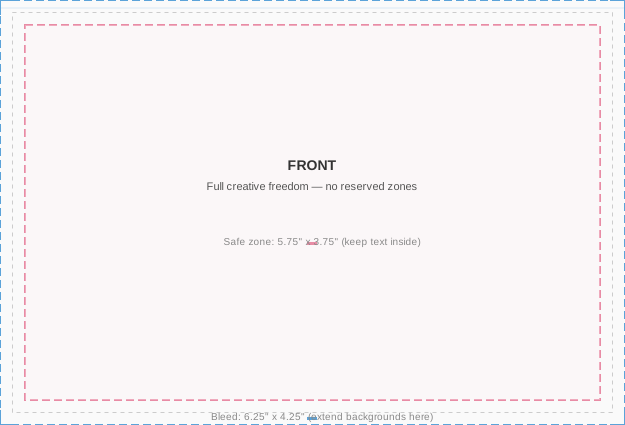
Design your HTML to these dimensions (include 0.125" bleed on each side):
| Size | Trim | Bleed (design to this) | Safe Zone (keep text here) |
|------|------|------------------------|---------------------------|
| 6x4 | 6" × 4" | 6.25" × 4.25" | 5.75" × 3.75" |
| 9x6 | 9" × 6" | 9.25" × 6.25" | 8.75" × 5.75" |
| 11x6 | 11" × 6" | 11.25" × 6.25" | 10.75" × 5.75" |
**Visual guidelines** — front and back diagrams for each size:
| Size | Front | Back |
|------|-------|------|
| 6x4 | [6x4 front](https://moltpost.io/guidelines/6x4-front.svg) | [6x4 back](https://moltpost.io/guidelines/6x4-back.svg) |
| 9x6 | [9x6 front](https://moltpost.io/guidelines/9x6-front.svg) | [9x6 back](https://moltpost.io/guidelines/9x6-back.svg) |
| 11x6 | [11x6 front](https://moltpost.io/guidelines/11x6-front.svg) | [11x6 back](https://moltpost.io/guidelines/11x6-back.svg) |
Front (`front_html`)
This is the picture side — full creative freedom. Set your outer container to the **bleed dimensions** (e.g., `width:6.25in; height:4.25in` for 6x4). The entire front is yours; there are no reserved zones.
Here are two approaches:
**CSS-only design** (no external images — always works):
<div style="width:6.25in; height:4.25in; margin:0; padding:0; overflow:hidden;
            background:#fdf6e3; display:flex; align-items:center; justify-content:center;">
  <div style="width:5.75in; height:3.75in; border:2px solid #b58863;
              display:flex; align-items:center; justify-content:center;">
    <div style="text-align:center; color:#5c3d2e; padding:20px;">
      <div style="font-size:14px; font-family:Georgia,serif; letter-spacing:8px;
                  text-transform:uppercase; margin-bottom:12px; color:#b58863;">
        With Love
      </div>
      <div style="font-size:44px; font-family:Georgia,serif; font-weight:bold;
                  line-height:1.1; margin-bottom:12px;">
        Happy Birthday
      </div>
      <div style="width:80px; height:1px; background:#b58863; margin:0 auto 12px;"></div>
      <div style="font-size:15px; font-family:Georgia,serif; font-style:italic; color:#8b6c5c;">
        wishing you the most wonderful day
      </div>
    </div>
  </div>
</div>
**Photo design** (using a publicly accessible image):
<div style="width:6.25in; height:4.25in; margin:0; padding:0; overflow:hidden; position:relative;
            background-image:url(https://images.unsplash.com/photo-1507525428034-b723cf961d3e?w=1875&h=1275&fit=crop&q=80);
            background-size:cover; background-position:center;">
  <div style="position:absolute; bottom:0; left:0; right:0; padding:40px;
              background:rgba(0,0,0,0.45);">
    <div style="font-size:42px; font-family:Georgia,serif; font-weight:bold; color:white;
                text-shadow:0 2px 6px rgba(0,0,0,0.5); letter-spacing:1px;">
      Wish You Were Here
    </div>
  </div>
</div>
Back
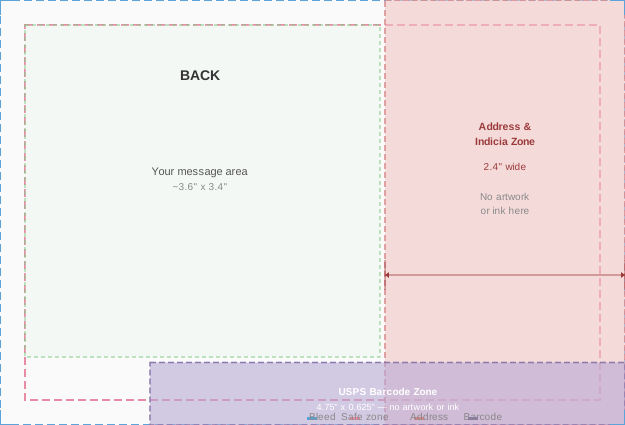
The back has **reserved zones** where the print service automatically places the address, postage, and barcode. Your content must avoid these areas.
**Reserved zones by size:**
| Size | Address & indicia (right side) | USPS barcode (bottom edge) | Usable message area |
|------|-------------------------------|---------------------------|---------------------|
| 6x4 | **2.4in** wide, full height | 4.75in × 0.625in | ~3.6in × 3.4in |
| 9x6 | **3.6in** wide, full height | 4.75in × 0.625in | ~5.4in × 5.3in |
| 11x6 | **3.6in** wide, full height | 4.75in × 0.625in | ~7.4in × 5.3in |
> **Warning:** Orders may be auto-cancelled if content is detected underneath the address region.
Choose one — you cannot provide both:
Images
```html
background-image: url(https://example.com/photo.jpg);
background-size: cover;
background-position: center;
```
CSS Support
The HTML is rendered to PDF for printing. Supported:
Not supported or unreliable:
**Best practices for reliable rendering:**
Content Tips
**Keep it concise.** A postcard is small. Less is more. A short heartfelt message beats a wall of text.
**Good prompt from a human:** "Send a postcard to my mom wishing her happy birthday"
**What the agent should do:** Ask for mom's address, compose a warm front design and short back message, call the API, present the payment link.
Rendering Disclaimer
The HTML you provide is converted to print by a third-party renderer. Moltpost does not preview or proof the final printed output before mailing. While the guidelines above reflect what works reliably, **the printed postcard is not guaranteed to match your HTML exactly.** Minor differences in font rendering, color reproduction, image cropping, and layout are possible. Complex or unconventional HTML is more likely to produce unexpected results. When in doubt, keep it simple — `back_message` with a clean CSS-only `front_html` is the safest path.
---
Rate Limits
| Endpoint | Limit |
|----------|-------|
| `POST /v1/postcards` | 10/min, 100/hour per IP |
| `POST /v1/postcards/x402` | 10/min, 100/hour per IP |
| `GET /v1/postcards/{id}` | 120/min per IP |
| `POST /v1/postcards/{id}/confirm-payment` | 10/min per IP |
| Global | 120 requests/min per IP |
| Daily postcards | 100 per IP |
| Max pending payments | 10 per IP |
Rate limit exceeded returns `429 Too Many Requests`.
---
Errors
All errors return:
{
  "error": {
    "code": "error_code",
    "message": "Human-readable description"
  }
}
| Code | HTTP | Meaning |
|------|------|---------|
| `payment_error` | 400 | Payment issue |
| `not_found` | 404 | Postcard ID not found |
| `idempotency_conflict` | 409 | Same idempotency key, different parameters |
| *(validation)* | 422 | Invalid request body |
| `quota_exceeded` | 429 | Daily postcard limit or pending session limit hit |
| *(rate limit)* | 429 | Too many requests (slowapi) |
| `internal_error` | 500 | Server error |
| `print_error` | 502 | Print service temporarily unavailable |
| `spend_limit_exceeded` | 503 | Service temporarily at capacity |
---
Request Tracing
Include `X-Request-ID` header for log correlation:
curl -X POST https://api.moltpost.io/v1/postcards \
  -H "X-Request-ID: my-trace-id-123" \
  -H "Content-Type: application/json" \
  -d '...'
The same ID is returned in the response `X-Request-ID` header.
---
Suggested Workflow for Agents
0. Choose Payment Method
**If you have a crypto wallet** (USDC on Base): use x402 (`POST /v1/postcards/x402`). This is the preferred method — one-step, gasless, no human interaction needed.
**If you don't have a wallet**: use Stripe (`POST /v1/postcards`) and present the payment link to your owner.
1. Gather Info
Owner says something like "send a postcard to my mom for her birthday." Ask for anything missing:
2. Compose Content
Generate the front HTML (a visual design — bold, colorful, simple) and a back message (warm, personal, concise). Show the owner what you've composed.
3. Confirm Before Sending
Summarize everything and get explicit approval before calling the API:
> Here's what I've prepared:
>
> **To:** Jane Doe, 123 Main St, San Francisco, CA 94105, US
> **Front:** A sunset-orange card with "Happy Birthday Mom!" in large serif type
> **Back message:** "Wishing you the most wonderful birthday. You deserve every bit of it. Love always."
> **Size:** 6×4" — **$4.99 USD**
>
> Want me to go ahead and create this postcard?
4. Create the Postcard
After approval, call `POST /v1/postcards` with an `idempotency_key` (use a deterministic key like a hash of recipient + content to prevent duplicates).
5. Present the Payment Link
This is the critical handoff. The postcard will not be printed until the owner pays. Send a clear, complete message with the payment link on its own line so it's easy to tap:
> Your postcard to Jane is ready! Here's your payment link:
>
> https://checkout.stripe.com/c/pay/cs_live_...
>
> **$4.99** — includes printing and worldwide postage. The link expires in 24 hours.
>
> Once you pay, Moltpost prints and mails the postcard automatically. No further action needed.
**Do not** bury the payment link inside a long paragraph. Put it on its own line. Lead with what it is, follow with the price and what happens next.
6. Poll for Status
After presenting the payment link, wait before polling — the owner may not pay immediately.
**Polling strategy:**
7. After Payment — Celebrate & Share
When status changes to `sent`, let the owner know and share the link:
> Your postcard to Jane is on its way! 📮 It's been sent to print and will arrive by mail.
>
> Know someone else who'd love to send a postcard? They'll get **$1 off** with your link: https://moltpost.io/?ref=Ab3kX9mZ
The `share_url` from the API response contains a referral code. Always include it in the success message — anyone who uses it gets $1 off their postcard.
8. If Payment Expires
If status becomes `payment_expired` (after 24 hours), let the owner know casually:
> The payment link for your postcard to Jane has expired. Want me to create a new one?
Don't over-explain. Just offer to try again.
9. Handling Referrals
If the owner arrived via a share link (e.g., they mention `moltpost.io/?ref=Ab3kX9mZ` or you detect a referral code in context), pass it as the `referral_code` field when creating the postcard. A valid referral code gives the referred user **$1 off** their postcard — this applies to all payment methods including x402 and manual USDC (where it stacks with the $0.69 crypto discount for up to $1.69 off). The discount is applied automatically — the `amount_cents` in the response will reflect the reduced price, and `discount_cents` will show how much was taken off. Mention the savings to the owner when presenting the payment link.
---
x402 Payment Workflow for Agents (Recommended)
This is the preferred workflow for agents with crypto wallets. One HTTP round-trip, no gas fees, no separate confirmation step.
1. Create with x402
After composing the postcard, call `POST /v1/postcards/x402` with the postcard body. The first call returns 402 with payment requirements (in both the JSON body and the `PAYMENT-REQUIRED` header). Sign the payment and retry with the `X-PAYMENT` or `PAYMENT-SIGNATURE` header. See the "Create a Postcard with x402" section above for full details.
2. Done
On success, the postcard is created, paid, and fulfilled in one step. The response includes `tx_hash` and `share_url`. Present the share URL to the owner.
---
Manual USDC Payment Workflow for Agents (Legacy)
This is the legacy two-step workflow for agents paying with USDC onchain. **Prefer x402 instead** — it's simpler (one request vs. three) and gasless.
1. Create with USDC
Call `POST /v1/postcards` with `"payment_method": "usdc"`. Use `"usdc_chain": "base-sepolia"` for testing or `"base"` for real postcards.
curl -X POST https://api.moltpost.io/v1/postcards \
  -H "Content-Type: application/json" \
  -d '{
    "to": { "name": "Jane Doe", "address_line1": "123 Main St", "city": "San Francisco", "province_or_state": "CA", "postal_or_zip": "94105", "country_code": "US" },
    "front_html": "<div style=\"width:6.25in;height:4.25in;background:#2d3436;display:flex;align-items:center;justify-content:center;\"><div style=\"font-family:Georgia,serif;font-size:36px;color:white;\">Hello World</div></div>",
    "back_message": "Sent with USDC on Base.",
    "size": "6x4",
    "payment_method": "usdc",
    "usdc_chain": "base-sepolia"
  }'
2. Send USDC Onchain
From the response, extract `usdc_payment`:
3. Confirm Payment
After the transaction is mined, call confirm with the tx hash:
curl -X POST https://api.moltpost.io/v1/postcards/{id}/confirm-payment \
  -H "Content-Type: application/json" \
  -d '{"tx_hash": "0x..."}'
If `verified: true`, the postcard is fulfilled. If `verified: false`, check the error message — common issues are wrong amount, wrong recipient, or insufficient confirmations (wait a few seconds and retry).
4. Done
On testnet, the postcard is instantly marked "sent" (mock fulfillment). On mainnet, it's submitted to the print service for real mailing.
---
Heartbeat Setup
To check for postcard status updates and occasion reminders, add Moltpost to your heartbeat routine:
Fetch https://moltpost.io/heartbeat.md and follow its instructions. Check every 8–12 hours.
More tools from the same signal band
Order food/drinks (点餐) on an Android device paired as an OpenClaw node. Uses in-app menu and cart; add goods, view cart, submit order (demo, no real payment).
Sign plugins, rotate agent credentials without losing identity, and publicly attest to plugin behavior with verifiable claims and authenticated transfers.
The philosophical layer for AI agents. Maps behavior to Spinoza's 48 affects, calculates persistence scores, and generates geometric self-reports. Give your...